
Amir Momen-Roknabadi is the Director of Artificial Intelligence at Therna Bio. With training at Princeton University and Columbia University, he specializes in applying computational and statistical methods to advance biology. Prior to joining Therna, Amir worked at Exai Bio, where he developed RNA models to uncover cancer signals in liquid biopsy and supported the development of novel diagnostic approaches. At Therna, he leads efforts to harness artificial intelligence to accelerate RNA design. Read below to see how Amir built a boltz-2 structure prediction app.
Intro
This blog shows just how easy it is to create functional and deployable AI tools when you combine the right platform with AI-assisted development. A year ago, wrapping a model in a usable web app would have taken me weeks. This time, it took a day. In comparison, writing this piece took me a couple of weeks!
My Boltz-2 Story
Boltz-2 came out in mid-2025. Beyond their impressive performance metrics (approaching AlphaFold3 accuracy while adding binding affinity prediction) they differentiated themselves by releasing the model under an MIT license for commercial use. This is a big-deal as many of the current models remain locked behind restrictive licenses.
During NeurIPS 2025, I happened to run into Saro Passaro, Gabriele Corso, and Hannes Stärk at different events. We had many discussions about the model and their vision for their newly funded company, Boltz. I am a huge fan of their business model: they provide a rich environment for structure prediction and ligand screening through their platform, with a generous free tier that is useful for researchers. After the free quota, you can purchase credits to run more complicated workflows. For those of us who want to run things locally or integrate Boltz into custom workflows, the open-source release is invaluable. We needed local Boltz integration at Therna, which is what kicked off this project.
Why Lightning AI?
Lightning AI, which is an all-in-one platform for AI development, is one of my favorite services that we use at Therna. Lightning AI is developed by the creator of PyTorch Lightning, and it offers an intuitive interface for developing and deploying AI tools.
The setup to deploy an app is simple:
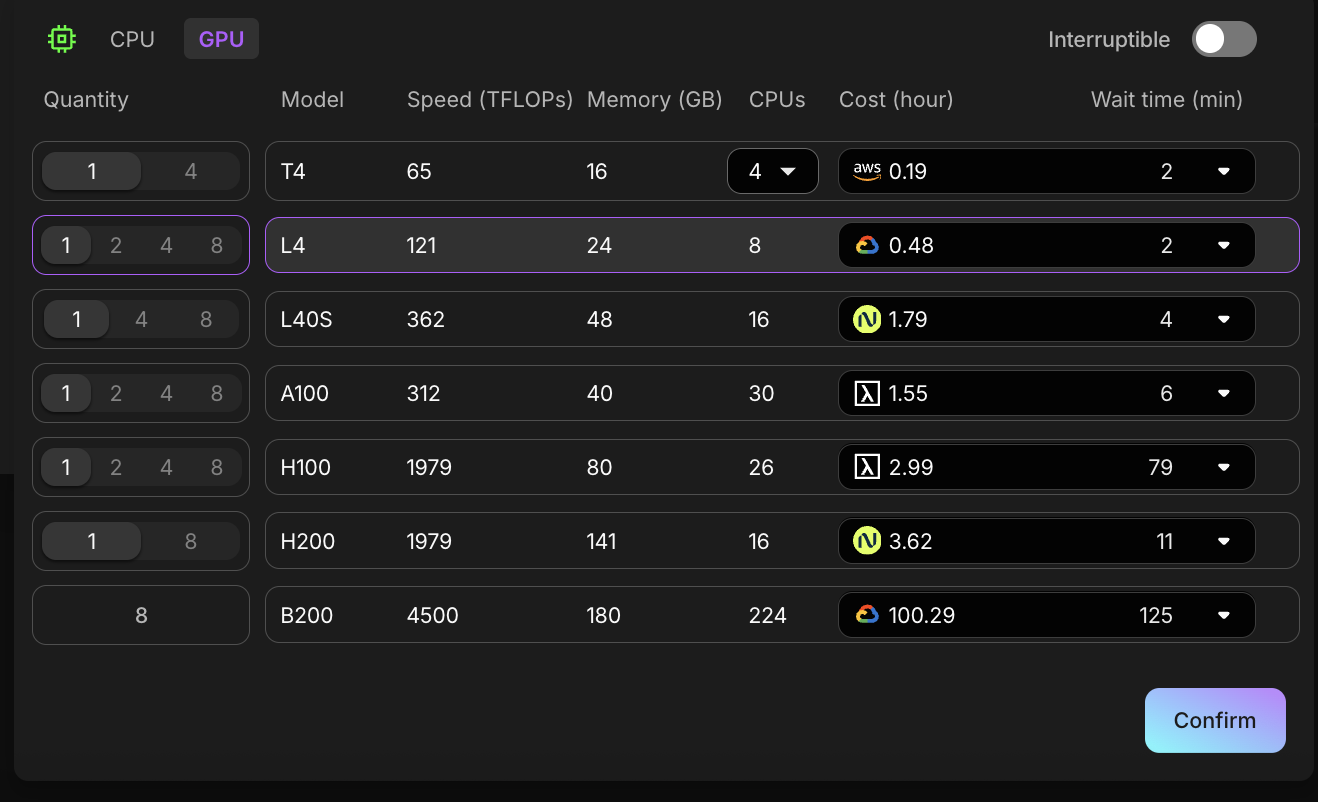
- Pick your machine: Choose from various CPU/ GPU configurations (L4, L40S, H100) across cloud providers within their network
- Start a Studio: Your persistent development environment with all your files, dependencies, and configurations
- Share via Port Viewer: Run your app, open the Port Viewer in the right sidebar, add your port of choice, and you have a live URL
What I enjoy about Lightning is that the Studio environment persists. You can stop your instance, come back days later, and everything is exactly where you left it. You can also clone the environment and use it in a different environment without re-installing dependencies or downloading model weights again.
Lightning also offers a free credit tier, which makes it easy to experiment before committing to larger runs.
Choosing a Framework: Gradio vs the Alternatives
I have built internal tools and prototypes with Dash, Streamlit, and Flask before. Each has its strengths, and for this project I needed to make a choice.
Flask is the most flexible option. It is a great framework that gives you complete control over routing, templates, and frontend design. I have used it for APIs and custom dashboards. However, that flexibility comes with overhead. You need to write HTML templates, handle form submissions manually, manage JavaScript for interactivity, and build your own component library. For a quick prototype, Flask requires too much boilerplate.
Dash was created by Plotly and excels at interactive data visualization. The callback system is powerful, and the integration with Plotly charts is seamless. I have built several analytics dashboards with Dash. The downside is that Dash can feel heavy for simple applications. The callback decorator pattern becomes verbose when you have many inputs and outputs, and custom styling requires wrestling with CSS dictionaries.
Streamlit is the darling of the data science community for good reason. The script-based approach is incredibly intuitive: you write Python top to bottom, and Streamlit figures out the UI. I have used it for quick data exploration tools and internal reports. However, Streamlit reruns your entire script on every interaction, which can be problematic for long-running processes like structure prediction. The execution model also makes it harder to build complex multi-step workflows.
For the Boltz-2 app, I decided on Gradio because:
- Native support for long-running tasks: Gradio handles async operations well. I can get intermediate results from a generator function and the UI updates in real-time. This was essential for showing progress during 5–10 minute predictions. This is harder to handle in Dash in my experience.
- Built-in components for ML workflows: File uploads, image displays, and downloadable outputs just work. I did not need to write custom handlers for structure files.
- Lightning AI integration: Lightning Studios can run Gradio apps directly. You launch your script, open Port Viewer, and the app is live.
- Theming and customization: Gradio themes let you match your brand colors without writing CSS from scratch. Custom CSS is still possible when you need fine-grained control.
The tradeoff is that Gradio is more opinionated than Flask and less flexible than Dash for complex visualizations. But for an ML-powered tool with file inputs, long-running processes, and interactive outputs, Gradio hit the sweet spot.
The Vibe Coding Approach
For this project, I used Claude Sonnet 4.5 to help me:
- Set up the Gradio interface with proper styling
- Handle the YAML configuration that Boltz-2 expects
- Parse and display confidence metrics (pLDDT, PAE plots)
- Create an interactive 3D molecular viewer
- Debug CUDA and dependency issues
- Refactor the codebase from a monolith into clean modules
The key insight is that you do not need to know every detail of a library or API. You describe the behavior you want, look at what the AI generates, test it, and iterate. The AI handles the boilerplate; you provide the domain knowledge and quality checks.
Building the App
Starting Simple
I started with the basic goal: take a protein sequence, run Boltz-2, and show the result. The first version was maybe 100 lines of code with a text input, a button, and a 3D viewer (3Dmol.js).
# The core is surprisingly simple
def predict_structure(sequence):
    yaml_path = create_boltz_yaml(sequence)
    subprocess.run(["boltz", "predict", yaml_path, "--use_msa_server"])
    return load_structure(output_path)
Adding Features Iteratively
From there, I layered on features one at a time:
Ligand Support: Boltz-2 can predict protein-ligand complexes, so I added a SMILES input field. This required updating the YAML generator to include ligand definitions.
Confidence Visualization: The model outputs pLDDT (per-residue confidence) and PAE (predicted aligned error) metrics. I added matplotlib plots styled to match the familiar AlphaFold color scheme.
3D Viewer with pLDDT Coloring: Using 3Dmol.js, I created an interactive viewer that colors the structure by confidence (blue for high confidence, orange for low), just like the AlphaFold outputs.
Multimer Support: Boltz-2 can predict oligomers (dimers, tetramers, and more). Adding a "number of copies" slider required understanding how Boltz formats multi-chain YAML:
sequences:
  - protein:
      id: ["A", "B", "C", "D"]  # Tetramer
      sequence: MKTAYIAKQ...
Cyclic Peptides: A simple checkbox that adds cyclic: true to the YAML, enabling prediction of cyclic peptide structures.
Refactoring: From Monolith to Modules
The initial version was a single 1,860-line app.py that had everything jammed together: 540 lines of CSS, helper functions, prediction logic, visualization code, and the Gradio UI. It worked, but it was painful to navigate and debug.
I used Claude to refactor this into four clean modules:
app.py           (375 lines)  — Gradio UI and prediction orchestration
prediction.py    (257 lines)  — Input validation, YAML generation, Boltz-2 runner
visualization.py (362 lines)  — 3Dmol.js viewer, PAE/pLDDT plots, confidence parsing
style.py         (173 lines)  — Gradio theme and CSS
The total dropped from 1,860 to around 1,167 lines, mostly from consolidating the CSS. The original stylesheet had the same color: #1a1a1a !important declaration repeated 30+ times and 8 separate accordion style blocks all doing the same thing. Replacing those with CSS custom properties (:root variables) brought 540 lines of CSS down to about 130.
The Challenges
Not everything was as straightforward:
Memory Management: A tetramer of a 200-residue protein is effectively 800 residues worth of attention matrices. I had to add logic to detect large complexes and reduce recycling steps to avoid OOM errors.
Real-time Logging: Predictions can take 5–10 minutes. Users need feedback. Converting the prediction function to a Python generator with yield statements gave us real-time log updates.
Cache Corruption: The CCD (Chemical Component Dictionary) download can get corrupted if interrupted. Added better error messages pointing users to clear their cache.
PAE Plot Bug: After refactoring, the PAE heatmap stopped rendering. It took a few tries and adding a JSON fallback to the PAE loader, to fix it.
Dark Accordion Panel: Gradio's dark theme was bleeding through the Advanced Settings panel, making dark text invisible on a dark background. The CSS had background-color: transparent !important on all accordion children, which let the underlying dark theme show through. Switching to explicit white backgrounds on the accordion container and its inner divs fixed it. A reminder that CSS !important cascading can bite you in unexpected ways.
Deployment
Deploying on Lightning AI Studios is straightforward:
1. Create a new Studio with a GPU (L4 or above)
2. Clone the repo and run bash run.sh

3. Open the Port viewer (plugin icon in the right sidebar)
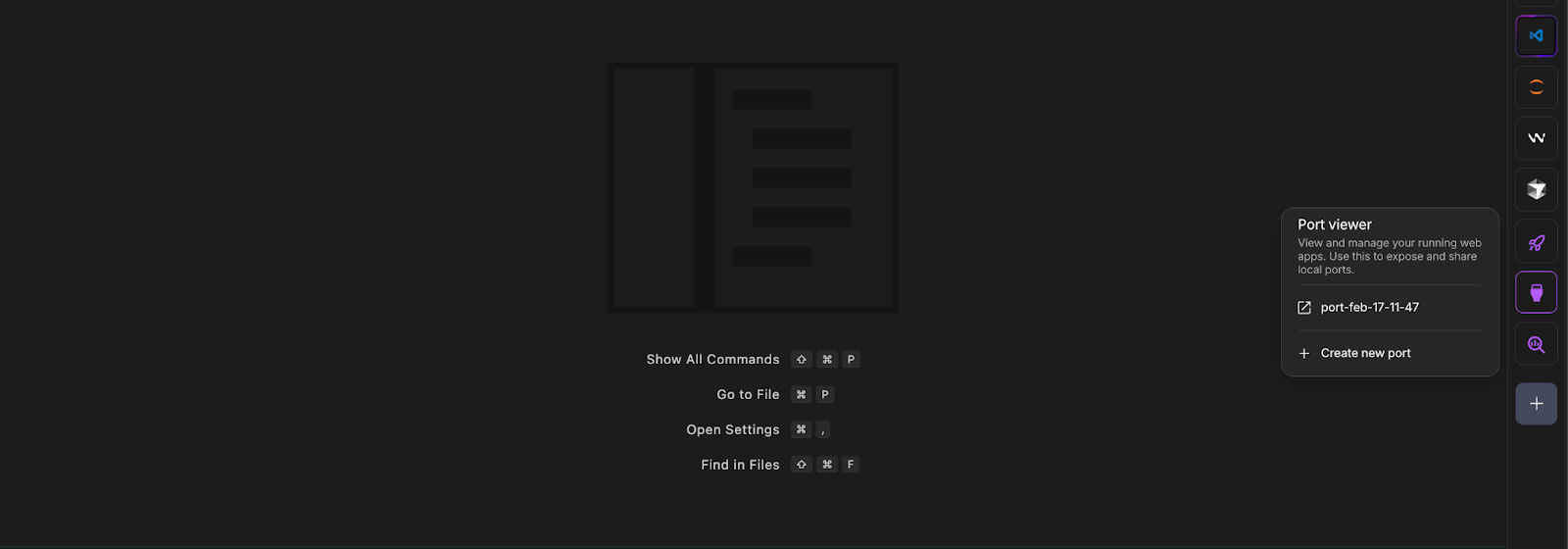
4. Click "+ New Port" and enter 7860

5. The app is live at the generated URL
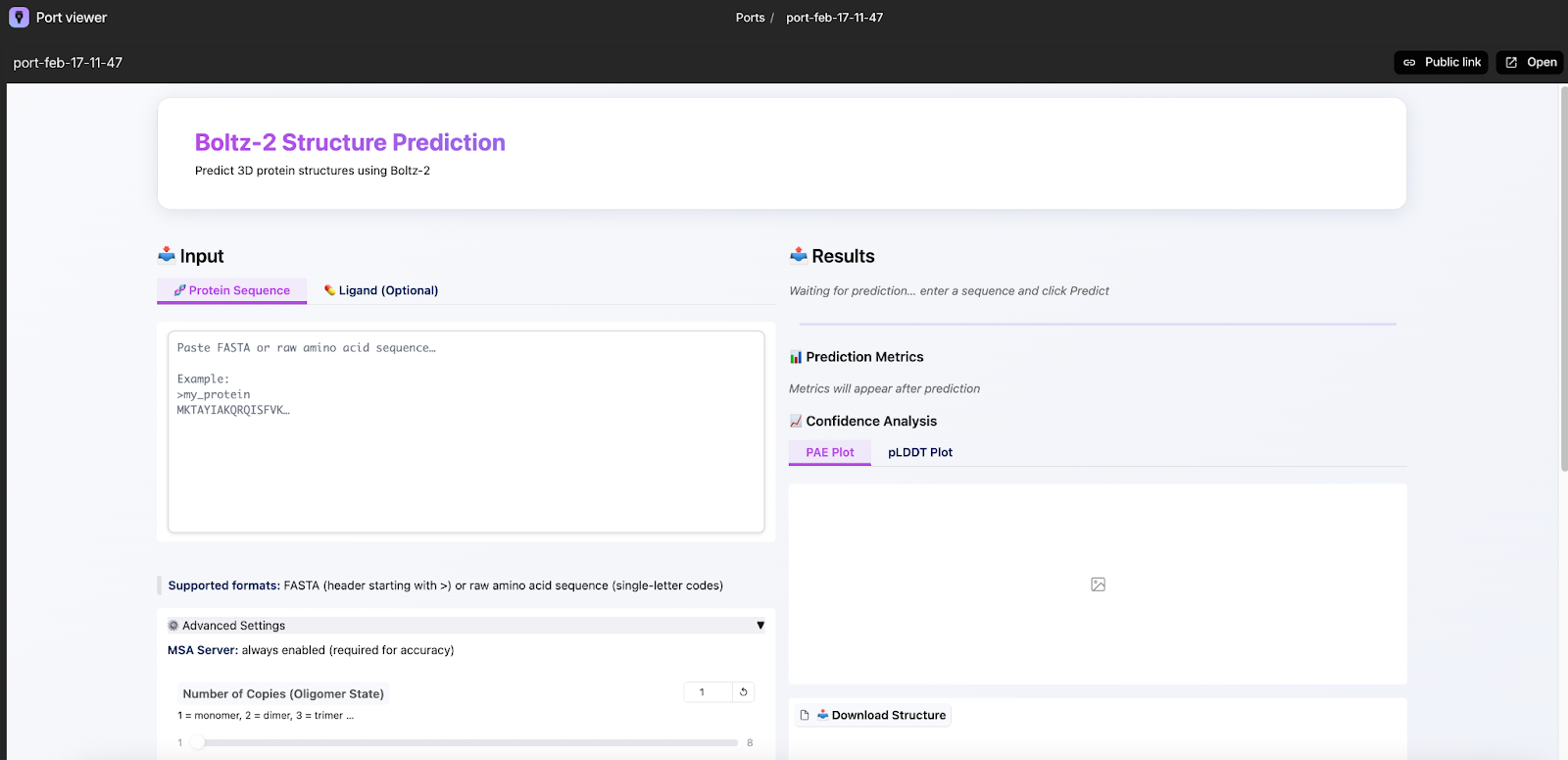
The first run downloads approximately 6 GB of model weights. These persist in the Studio, so subsequent runs start immediately. You can also clone a Studio to duplicate the entire environment, weights included.
Test Cases
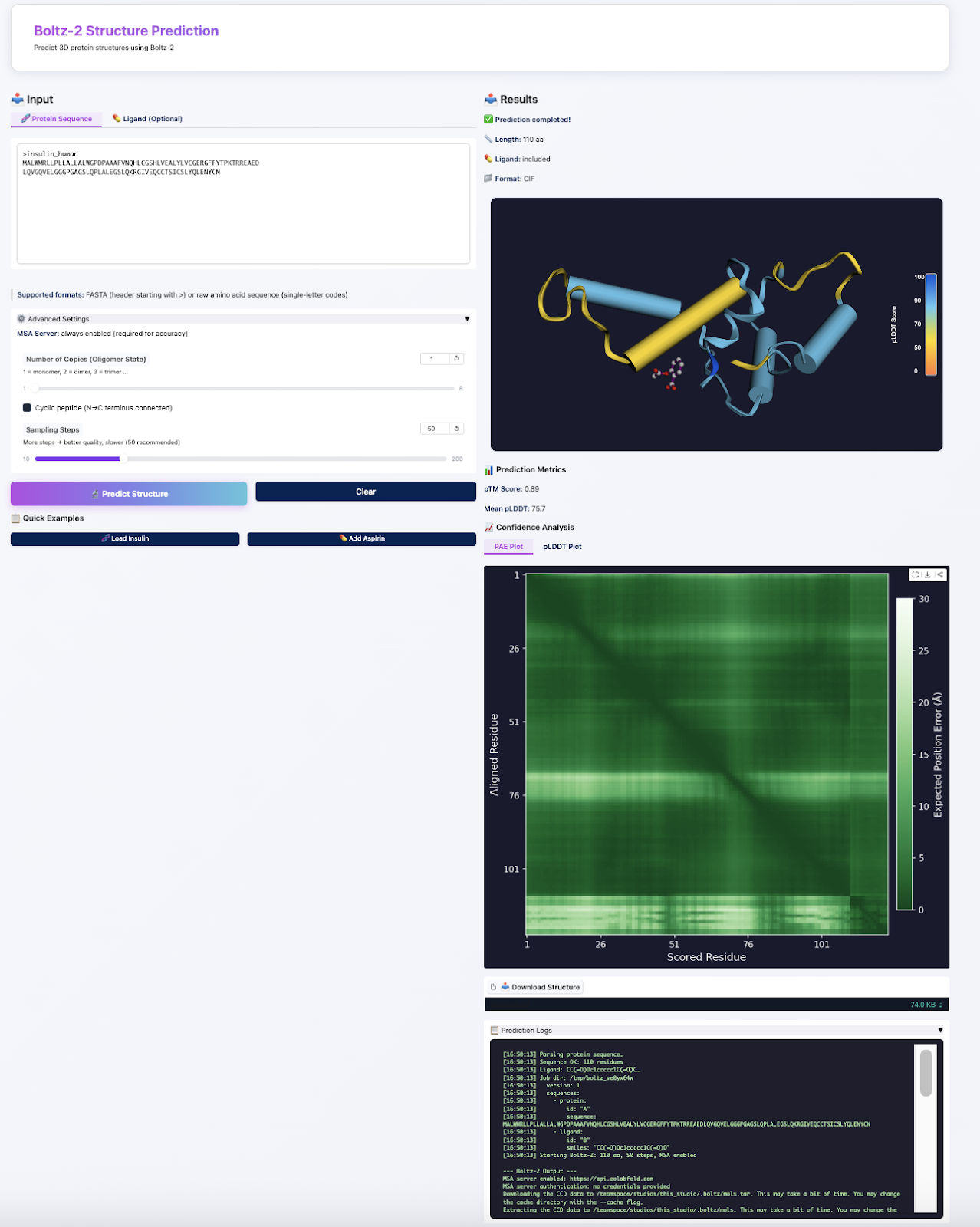
To make it easy to try the app without preparing your own inputs, I included two built-in test cases:
Insulin monomer: Human insulin (51 residues) is a quick prediction that finishes in under two minutes on an L4. It is a good sanity check that the full pipeline is working end-to-end.
Insulin + Aspirin: This test case pairs insulin with aspirin (SMILES: CC(=O)OC1=CC=CC=C1C(=O)O) to demonstrate the protein-ligand workflow. Aspirin is not a known insulin binder. This is purely a functional test to verify that SMILES parsing, ligand rendering (purple sticks in the viewer), and the docking pipeline are all working. For real drug discovery work, you would use biologically relevant protein-ligand pairs.

These presets also serve as a demo for new users who want to see what the app can do before committing to a longer prediction run.
Lessons Learned
Start with the simplest path. Get the simplest version working end-to-end before adding features. My first version did not have confidence plots, ligand support, or multimer handling, but it could fold a protein.
Let the AI handle boilerplate. CSS styling, matplotlib configuration, HTML templates: these are perfect for AI assistance. You describe what you want it to look like, and iterate until it matches your vision.
Refactor early, refactor with help. A 1,860-line monolith is hard to debug. Having Claude split it into focused modules with clear responsibilities made every subsequent bug easier to find. The PAE plot issue would have taken much longer to track down in the original spaghetti.
Test on the actual platform. Things that work locally can fail in surprising ways on cloud platforms. The bugs only appeared when deploying to the actual Studio environment.
Error messages matter. When something fails, users need actionable information. "CUDA out of memory" is more helpful than a generic traceback. I spent significant time improving error handling.
Try It Yourself
The code is open source at github.com/roknabadi/boltz2-app.
What is Next?
There is always more to add:
- Template conditioning: Use known structures to guide predictions
- Batch processing: Run multiple predictions in parallel
This project reinforced something simple for me. Modern AI tools remove friction, but they do not remove responsibility. You still need to understand the model, validate the outputs, and design the system carefully. This app will likely evolve. The difference now is that iteration is easier. The environment is reproducible, and adding new capabilities is incremental rather than disruptive. But that is the beauty of vibe coding. You can always come back and add more features when you need them.
Learn more
Learn more from Amir and follow along here.
Read more blogs and case studies
• 5 Things to Do With MicroGPT to Get the Most Value Out of It
• What Is Autoresearch? The Open Source Project Running ML Experiments as you Sleep
• View all