
PyTorch Lightning reaches cloud storage through Filesystem Spec (fsspec), the standard Python filesystem interface that has also been widely adopted in the PyTorch ecosystem. It connects to various storage systems including hyperscalers like Google Cloud, AWS, and Azure. Because PyTorch Lightning already routes through fsspec, a fix built for one cloud provider improves the path for every storage backend behind that interface. We worked with Google Cloud to improve PyTorch Lightning checkpointing, which now runs up to 95% faster on Google Cloud Storage.
How we fixed the storage bottleneck
We integrated Rapid Buckets into PyTorch Lightning via GCSFS . GCSFS is the fsspec implementation for Google Cloud Storage. This native integration forgoes legacy REST APIs in favor of persistent, bidirectional gRPC streams. That change delivers aggregate throughput over 15 TiB/s and latency under 1ms.
This migration requires no code changes while delivering a significant speedup to data loading and checkpointing, making sure they did not become primary bottlenecks. Developers simply point their existing Pytorch Lightning’s storage calls to a Rapid Bucket by changing the bucket name.
What we changed in PyTorch Lightning
Three fixes landed. All three ship in PyTorch Lightning and work against any fsspec backend.
1. Checkpoint writes now read straight from the file
PyTorch Lightning previously called write() to save checkpoints. When using write(), data is uploaded in chunks up to a maximum size of 256 MB, resulting in a slow process if a large chunk of data is passed at once. After each chunk uploads, write() copies all remaining unwritten data into a new buffer before continuing. For example, for a 50 GB file, after the first 256 MB is uploaded, it copies ~49.7 GB after the first chunk, then ~49.4 GB after the second, and so on, the same data gets copied again and again as the upload proceeds.
PyTorch Lightning now uses pipe() for checkpointing, a more efficient method that avoids large copying. pipe() reads the next chunk directly from the file each time, without copying the remaining data into a new buffer first.
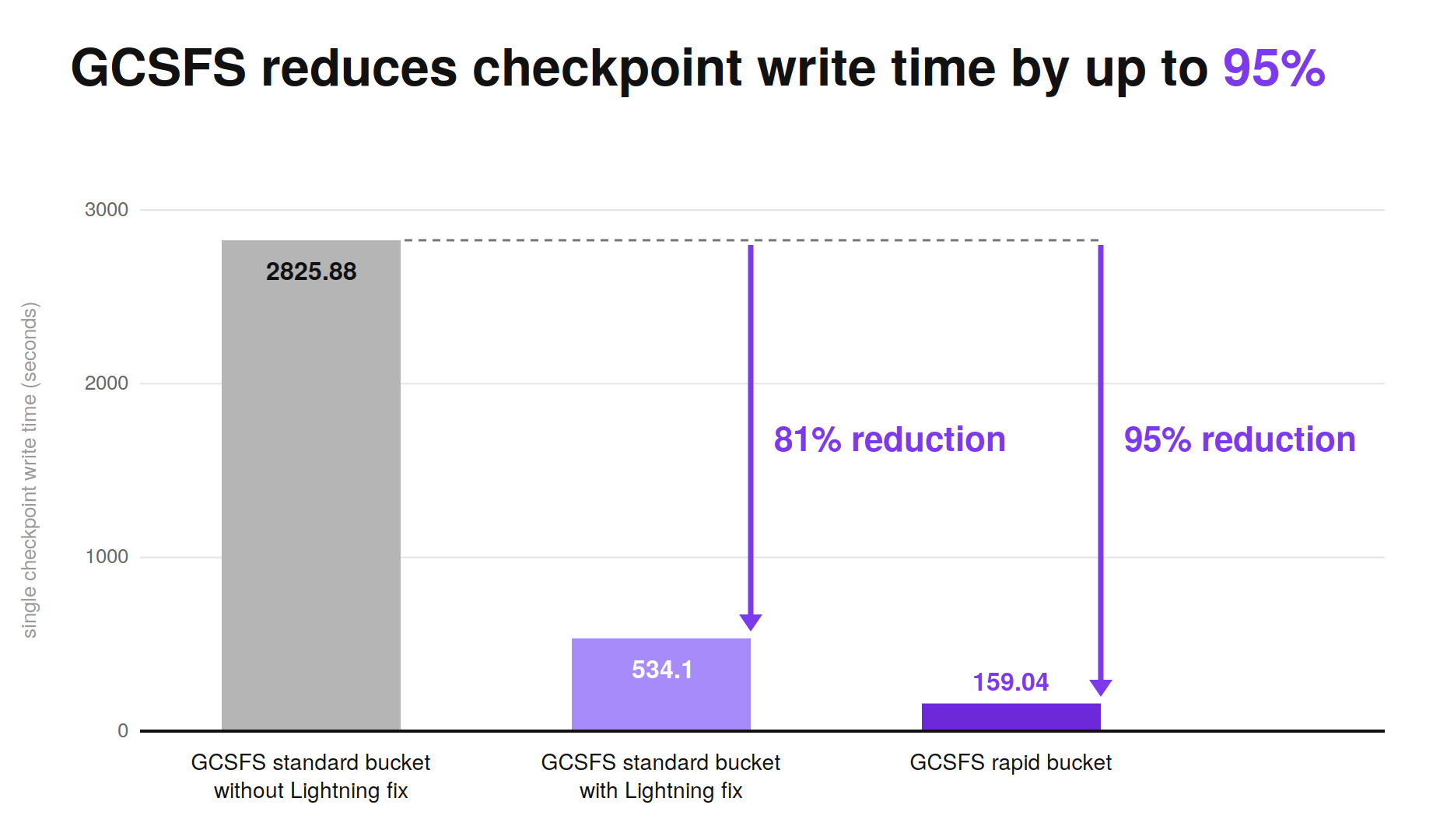
This one change cuts checkpoint write time up to 81% on standard GCS buckets, and up to 95% on Rapid Buckets.
2. FSDP checkpointing understands object storage
FSDP checkpointing in PyTorch Lightning previously assumed local paths. It calls methods like path.is_dir(), which means nothing to an object storage bucket. Teams worked around it: stage checkpoints to local disk, copy them up, hope the copy finished before the next epoch needed the space.
PyTorch Lightning now uses PyTorch Distributed Checkpoint through FsspecWriter and FsspecReader. Point dirpath at a gs:// or s3:// URI and FSDP handles the rest, no local disk staging required.
3. Dataloader setup shows up in the profiler
Worker initialization was previously invisible. FitLoop.setup_data() now wraps iterator creation in a profiling action called setup_train_dataloader. Initialization and prefetch spikes now show up in the standard Fit Profiler Report. This added observability into worker initialization times ensures latency spikes don’t go unnoticed.
What this looks like on Google Cloud
For PyTorch Lightning users, the migration is as simple as switching a bucket name.
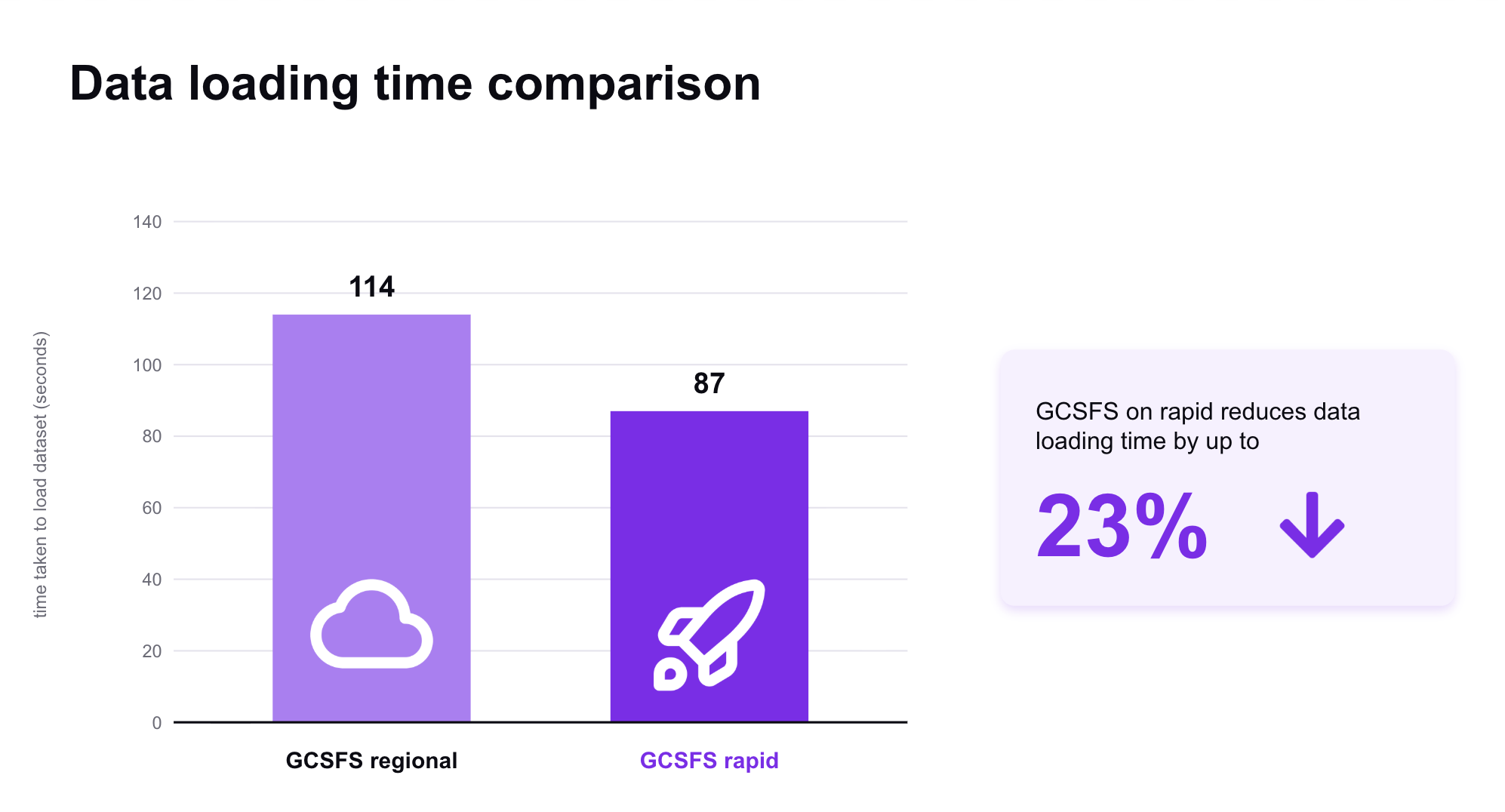
In joint testing with Google Cloud, we measured a 23% reduction in data loading time on Rapid Buckets compared to standard buckets, plus a further 70% reduction in checkpoint write time on top of the pipe() gains.
Get started
Install GCSFS >2026.8.0 to ship a prefetcher that speeds up data loading and checkpoint restore. PyTorch Lightning >=2.6.5 includes the checkpoint and profiler changes.
import pytorch_lightning as pl
from pytorch_lightning.callbacks import ModelCheckpoint

GCS_BUCKET_PATH = "gs://your-bucket-name/checkpoints/"

checkpoint_callback = ModelCheckpoint(
    dirpath=GCS_BUCKET_PATH,
    filename="sample-model-{epoch:02d}",
    save_top_k=1,
    monitor="val_loss",
)

# PyTorch Lightning routes through fsspec, so GCSFS handles the transport
trainer = pl.Trainer(
    accelerator="gpu",
    devices=1,
    callbacks=[checkpoint_callback],
    default_root_dir=GCS_BUCKET_PATH,
)